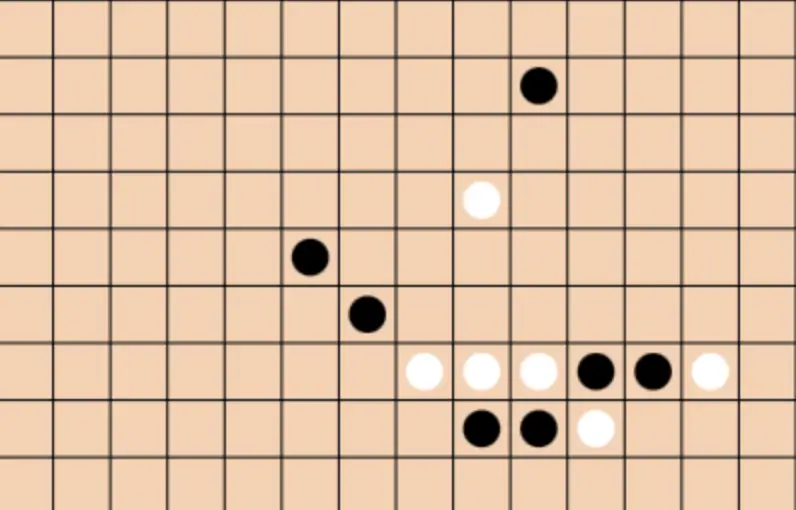
完整的五子棋游戏的HTML页面代码,满足你所有的要求。这个页面包括一个400×400像素的画布,玩家可以通过点击画布下棋,黑棋先行,并且会在一方连成五个相同的棋子时显示获胜信息。
设计说明:
- HTML结构:
- 包含一个
canvas元素,用于绘制五子棋棋盘和棋子。 - 包含一个
div元素 (id="message"),用于显示游戏消息(如获胜信息)。
- 包含一个
- CSS样式:
- 设置了页面的基本样式,包括背景颜色、字体和布局。
- 使用
flex布局使内容居中对齐。 - 为
canvas添加了背景颜色和阴影效果。 - 设置了提示信息的字体大小和居中显示。
- JavaScript功能:
- 绘制15×15的棋盘网格。
- 使用
arc方法在棋盘交界处绘制圆形棋子。 - 处理用户点击事件,根据当前玩家放置棋子。
- 检查是否有玩家连成五个相同的棋子,如果有则显示获胜信息并结束游戏。
<!DOCTYPE html>
<html lang="zh-CN">
<head>
    <meta charset="UTF-8">
    <meta name="viewport" content="width=device-width, initial-scale=1.0">
    <title>五子棋游戏</title>
    <style>
        body {
            margin: 0;
            padding: 0;
            display: flex;
            justify-content: center;
            align-items: center;
            height: 100vh;
            background-color: #f0f0f0;
            font-family: Arial, sans-serif;
        }
        .game-container {
            text-align: center;
        }
        canvas {
            background-color: #f3d2b5;
            box-shadow: 0 4px 8px rgba(0, 0, 0, 0.2);
        }
        #message {
            font-size: 20px;
            margin-top: 20px;
        }
    </style>
</head>
<body>
    <div class="game-container">
        <canvas id="goBoard" width="400" height="400"></canvas>
        <div id="message"></div>
    </div>

    <script>
        const canvas = document.getElementById('goBoard');
        const ctx = canvas.getContext('2d');
        const boardSize = 15; // 15x15 棋盘
        const cellSize = canvas.width / (boardSize - 1);
        let currentPlayer = 'black'; // 黑棋先行
        let board = Array.from({ length: boardSize }, () => Array(boardSize).fill(null));
        let gameEnded = false;

        function drawBoard() {
            for (let i = 0; i < boardSize; i++) {
                ctx.beginPath();
                ctx.moveTo(i * cellSize, 0);
                ctx.lineTo(i * cellSize, canvas.height);
                ctx.stroke();

                ctx.beginPath();
                ctx.moveTo(0, i * cellSize);
                ctx.lineTo(canvas.width, i * cellSize);
                ctx.stroke();
            }
        }

        function drawStone(x, y, color) {
            ctx.beginPath();
            ctx.arc(x, y, cellSize / 2 - 5, 0, Math.PI * 2);
            ctx.fillStyle = color;
            ctx.fill();
        }

        function getCellPosition(event) {
            const rect = canvas.getBoundingClientRect();
            const x = event.clientX - rect.left;
            const y = event.clientY - rect.top;
            return {
                row: Math.round(y / cellSize),
                col: Math.round(x / cellSize)
            };
        }

        function checkWin(row, col, player) {
            const directions = [
                { dx: 1, dy: 0 },  // 水平
                { dx: 0, dy: 1 },  // 垂直
                { dx: 1, dy: 1 },  // 斜线 /
                { dx: 1, dy: -1 }  // 斜线 \
            ];

            for (const direction of directions) {
                let count = 1;
                for (let i = 1; i < 5; i++) {
                    const newRow = row + direction.dy * i;
                    const newCol = col + direction.dx * i;
                    if (newRow >= 0 && newRow < boardSize && newCol >= 0 && newCol < boardSize && board[newRow][newCol] === player) {
                        count++;
                    } else {
                        break;
                    }
                }
                for (let i = 1; i < 5; i++) {
                    const newRow = row - direction.dy * i;
                    const newCol = col - direction.dx * i;
                    if (newRow >= 0 && newRow < boardSize && newCol >= 0 && newCol < boardSize && board[newRow][newCol] === player) {
                        count++;
                    } else {
                        break;
                    }
                }
                if (count >= 5) {
                    return true;
                }
            }
            return false;
        }

        function placeStone(row, col) {
            if (board[row][col] !== null || gameEnded) return;

            board[row][col] = currentPlayer;
            drawStone((col + 0.5) * cellSize, (row + 0.5) * cellSize, currentPlayer);

            if (checkWin(row, col, currentPlayer)) {
                document.getElementById('message').innerText = `${currentPlayer === 'black' ? '黑棋' : '白棋'} 获胜!`;
                gameEnded = true;
                return;
            }

            currentPlayer = currentPlayer === 'black' ? 'white' : 'black';
        }

        canvas.addEventListener('click', function(event) {
            const { row, col } = getCellPosition(event);
            placeStone(row, col);
        });

        drawBoard();
    </script>
</body>
</html>
No responses yet