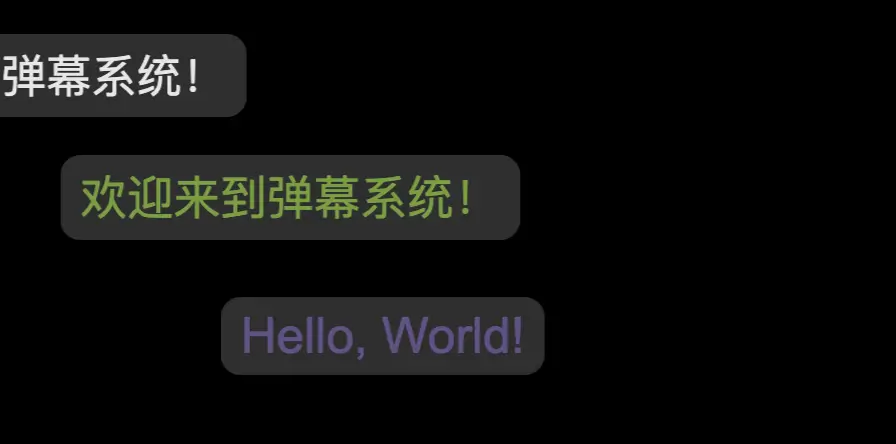
一个简单的弹幕效果示例,这个示例使用了HTML、CSS和JavaScript来创建一个全屏的弹幕系统。
解释
HTML结构:包含一个div容器用于放置弹幕。
CSS样式:
- 设置背景为黑色,文字颜色为白色。
- 定义
.bullet-screen-container为绝对定位,覆盖整个屏幕。 - 定义
.bullet-screen为绝对定位,并设置动画效果moveLeft使其从右向左移动。
JavaScript逻辑:
createBulletScreen函数用于创建单个弹幕。- 随机化每个弹幕的颜色和字体大小。
- 随机设置垂直位置。
- 添加动画效果并设置动画持续时间。
- 使用
setInterval定期添加新的弹幕消息。
你可以根据需要调整消息内容、颜色、字体大小和动画速度,以获得不同的视觉效果。
<!DOCTYPE html>
<html lang="en">
<head>
    <meta charset="UTF-8">
    <meta name="viewport" content="width=device-width, initial-scale=1.0">
    <title>弹幕效果</title>
    <style>
        body, html {
            margin: 0;
            padding: 0;
            overflow: hidden;
            background-color: black;
            color: white;
            font-family: Arial, sans-serif;
        }
        .bullet-screen-container {
            position: absolute;
            top: 0;
            left: 0;
            width: 100%;
            height: 100%;
            pointer-events: none;
            z-index: 1000;
        }
        .bullet-screen {
            position: absolute;
            white-space: nowrap;
            font-size: 20px;
            opacity: 0.9;
            padding: 5px 10px;
            background-color: rgba(255, 255, 255, 0.2);
            border-radius: 10px;
        }
        @keyframes moveLeft {
            from {
                transform: translateX(100%);
            }
            to {
                transform: translateX(-100%);
            }
        }
    </style>
</head>
<body>
    <div class="bullet-screen-container"></div>

    <script>
        const container = document.querySelector('.bullet-screen-container');

        // 创建弹幕函数
        function createBulletScreen(text) {
            const bulletScreen = document.createElement('div');
            bulletScreen.classList.add('bullet-screen');
            bulletScreen.textContent = text;

            // 随机化颜色和字体大小
            const colors = ['#FFFFFF', '#FF6F61', '#6B5B95', '#88B04B', '#F7CAC9'];
            const randomColor = colors[Math.floor(Math.random() * colors.length)];
            const randomSize = Math.random() * 10 + 16; // 字体大小在16到26之间

            bulletScreen.style.color = randomColor;
            bulletScreen.style.fontSize = `${randomSize}px`;

            // 随机设置垂直位置
            const randomTop = Math.random() * 90; // 垂直位置在0到90%之间
            bulletScreen.style.top = `${randomTop}vh`;

            // 添加动画效果
            bulletScreen.style.animation = `moveLeft ${Math.random() * 10 + 5}s linear forwards`; // 动画持续时间在5到15秒之间

            container.appendChild(bulletScreen);

            // 动画结束后移除弹幕
            setTimeout(() => {
                container.removeChild(bulletScreen);
            }, (Math.random() * 10 + 5) * 1000);
        }

        // 示例消息数组
        const messages = [
            "Hello, World!",
            "欢迎来到弹幕系统!",
            "享受表演吧!",
            "这是一个测试消息。",
            "另一条消息!"
        ];

        // 添加随机消息的函数
        function addRandomMessage() {
            const randomMessage = messages[Math.floor(Math.random() * messages.length)];
            createBulletScreen(randomMessage);
        }

        // 每2秒添加一个新的弹幕
        setInterval(addRandomMessage, 2000);
    </script>
</body>
</html>
No responses yet